.webp)
.webp)
Fellow wants to be your team's central hub for meetings, not just another recording tool.
Which is a bold claim in a crowded market.
Here's the thing about AI meeting assistants. Most of them record your calls, spit out some notes, and call it a day.
Fellow is trying to do something different by handling the entire meeting lifecycle.
The pitch is simple: integrate meeting prep, real-time recording, team collaboration, and post-meeting workflows into a single platform that actually helps companies stay aligned.
They promise that instead of scattered notes and lost action items, you get structure and accountability from the moment a meeting hits your calendar.
After using it across dozens of calls over the past few months, I found that pitch to be largely true.
The onboarding is genuinely helpful without being overwhelming. Security controls are deep and well-thought-out, with clear policies about never using your data to train AI models. The collaboration features actually make meetings more productive instead of just documenting them. And action items work like real tasks instead of text snippets you'll ignore forever.
But Fellow stumbles in a few predictable places.
The export functionality is difficult to find unless you know what you’re looking for, making it clunky to get your raw transcripts out. It took me weeks of using the app to figure that process out. Botless recordings have no automated disclosure for external participants, creating some real liability concerns. Some AI-generated action items miss the mark completely, which is frustrating for a feature that's supposed to be a core differentiator.
These limitations and strengths landed Fellow at 84 out of 100 in my evaluation across onboarding, security, collaboration, integrations, and output quality.
Now, let's break down exactly where Fellow excels and where it falls short, starting with First Use & Onboarding.
1. First Use & Onboarding (17/20)
The first few minutes with any AI-first app determine whether you'll actually use it or let it collect dust. And meeting tools like Fellow need to prove their value fast, especially because there are new ones popping up in the space all the time.
Fellow handles this better than most tools in this space. The sign-up flow includes a few setup questions that save time later, the onboarding guidance is solid without being overwhelming, and you can literally record a meeting minutes after signing up.
My only major complaint, and Fellow is not alone here, is that the real aha moment doesn’t happen right away, which might lose some users during trial periods.
Sign-up process (4/5)
Signing up for Fellow follows the standard SaaS playbook. Just answer a few questions about how you plan to use the tool, and you’re on your way. It’s nothing fancy, but it also doesn’t add extra friction to the process. You do have to download the Fellow app, but most of these meeting recording apps require a download these days.
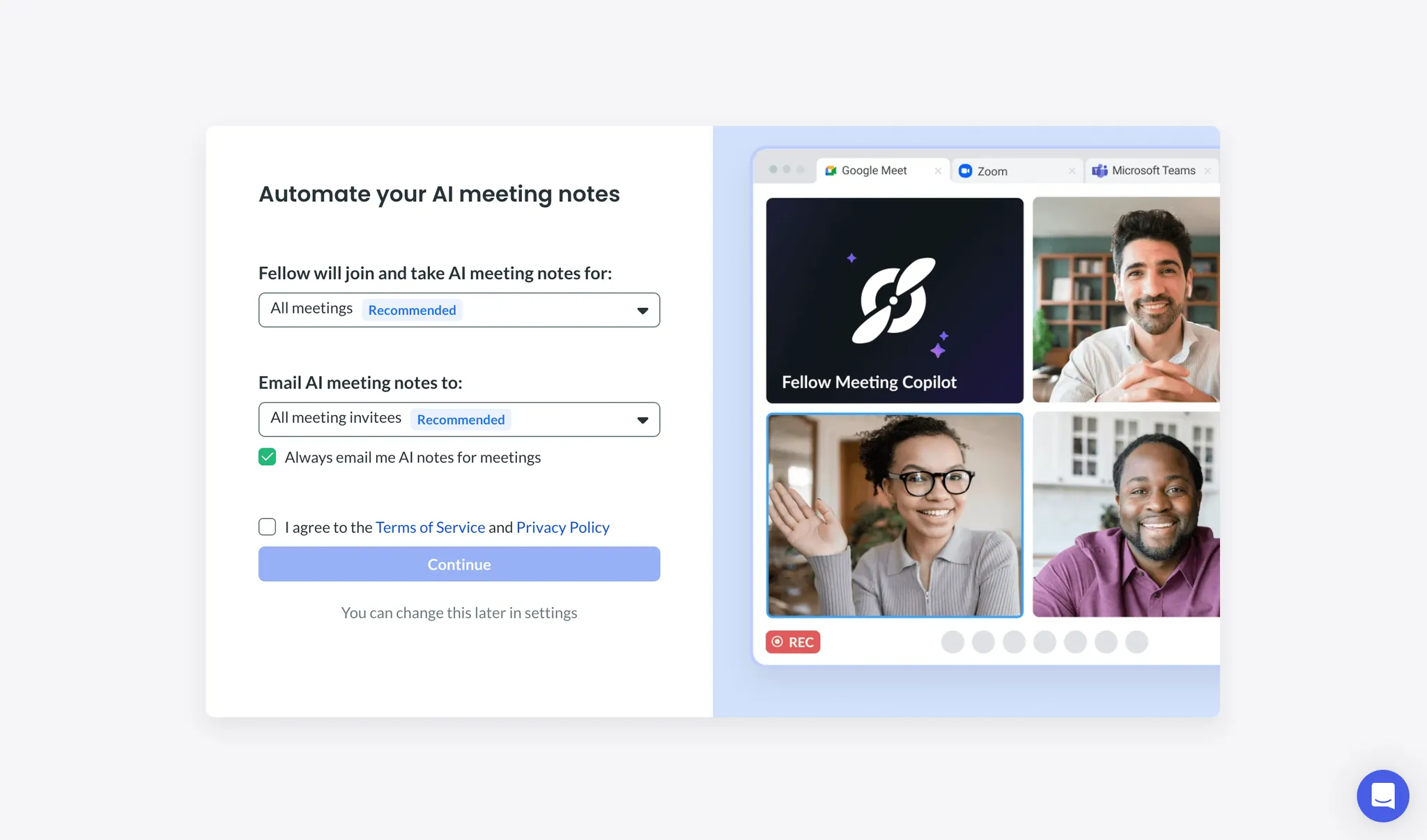
One thing that I appreciated was that they built setup questions right into the sign-up flow. You can set up basic recording preferences for your bot right there instead of hunting through settings later.
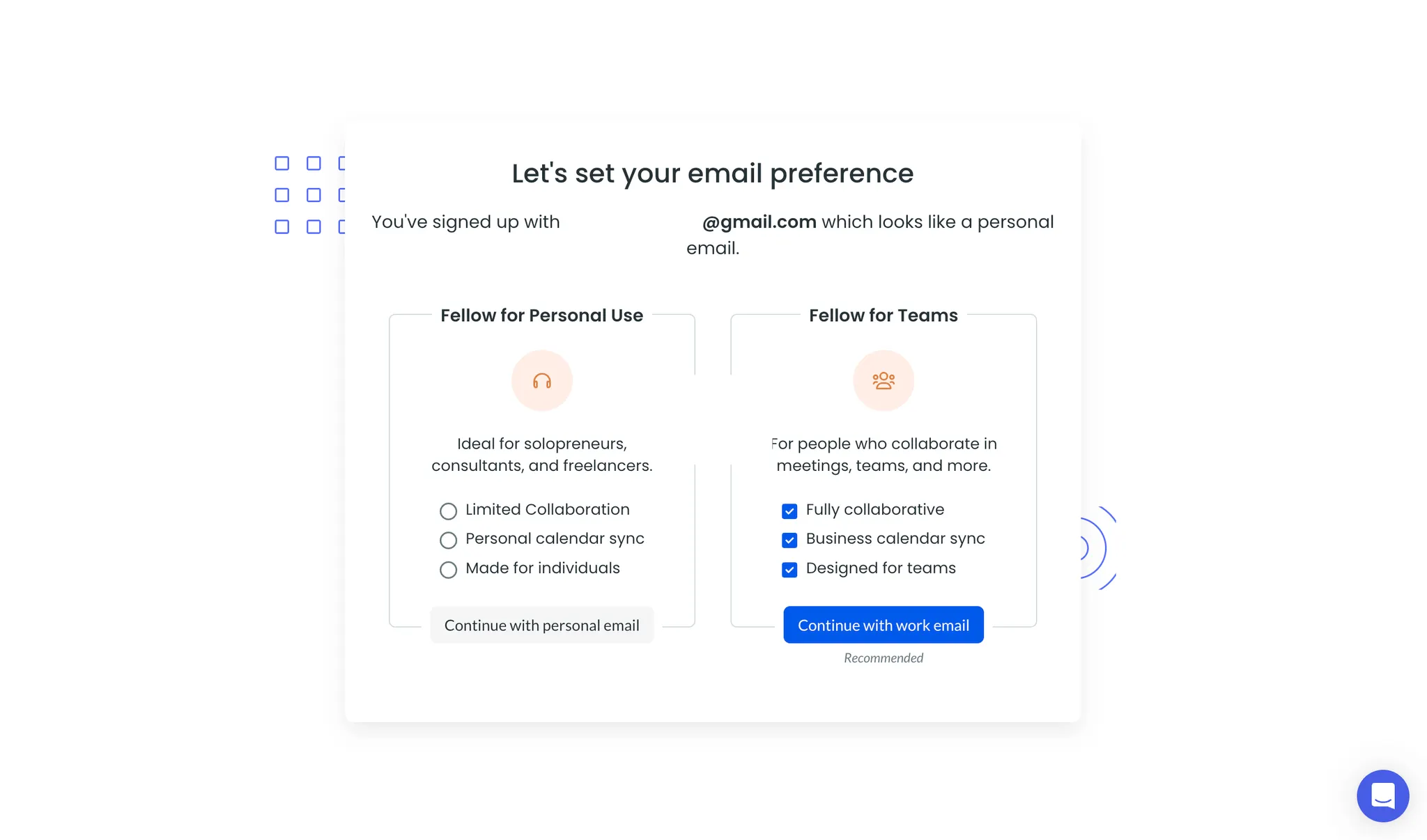
Email flexibility deserves a callout here, too. While Fellow recommends using your work email, you can sign up with a personal email or Gmail account without any weird workarounds. This is great for freelancers, consultants, and anyone who blurs the line between work and personal calendars, like I do.
Onboarding guidance (5/5)
A common problem I have with AI-first tools is that they just throw you into the app without any real guidance. A blank screen or chat box with no real direction is the last thing you want to see as a new user.
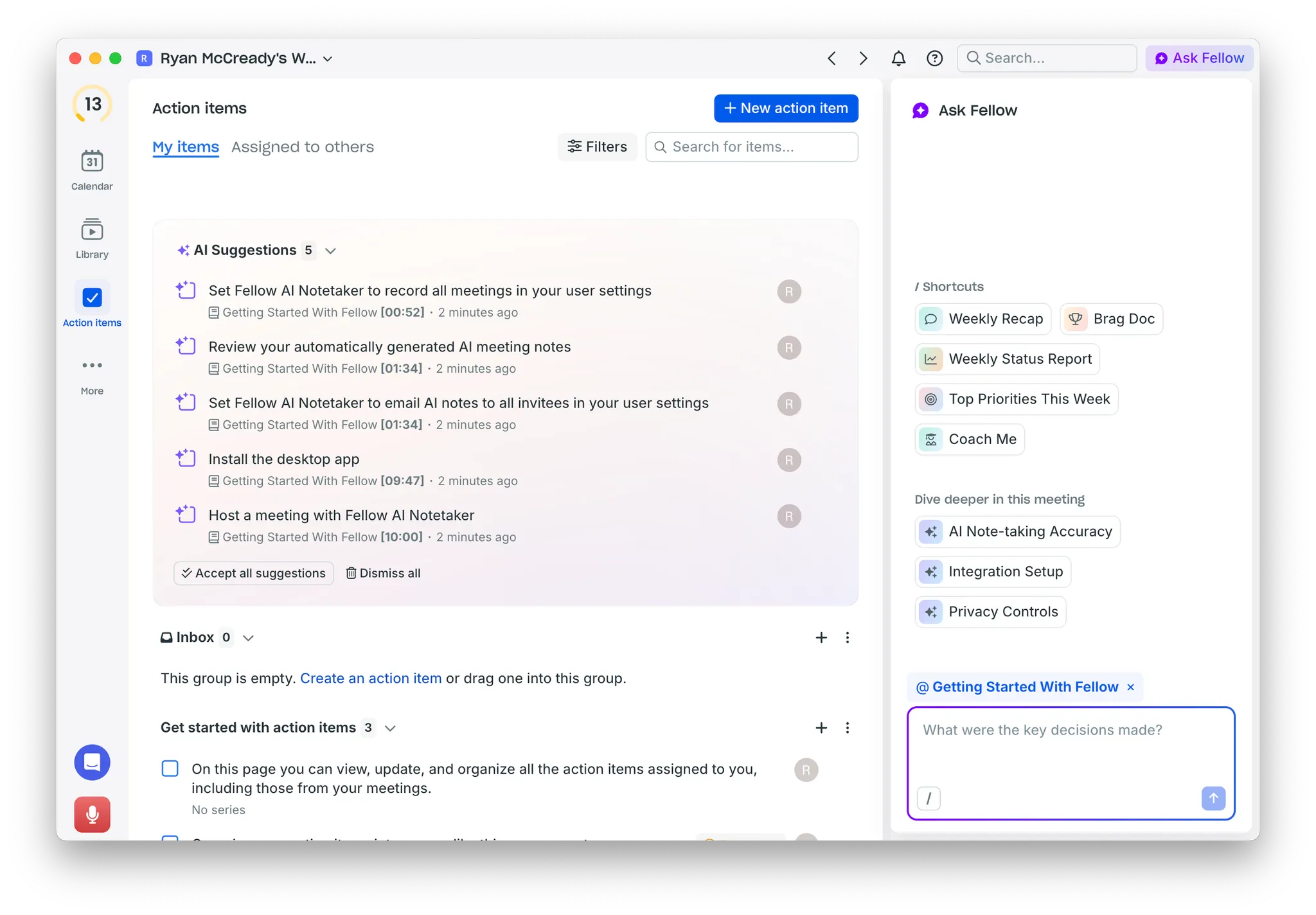
Fellow kinda does the opposite. As soon as you sign in for the first time, you’re greeted by a list of action items that highlight core features and next steps. Each item links directly to relevant parts of the onboarding video, featuring the founder, if you want to learn more. And the chat function shows helpful shortcuts right away instead of being an empty void.
My only knock in this section is the 12-minute onboarding video. Some new users will see that long runtime and skip it entirely, which is a shame because the content is great. Breaking it into smaller, bite-sized videos tied to specific moments would probably work better.
Time to aha moment (3/5)
Here's the problem with every meeting recording tool I have tested. You can't appreciate the features until you've actually used the product for a handful of real calls.
Even if you sign up today and are super excited to try it out, your next important meeting might not be until tomorrow or next week. That delay hurts a lot of the momentum that you might feel with other new tools.
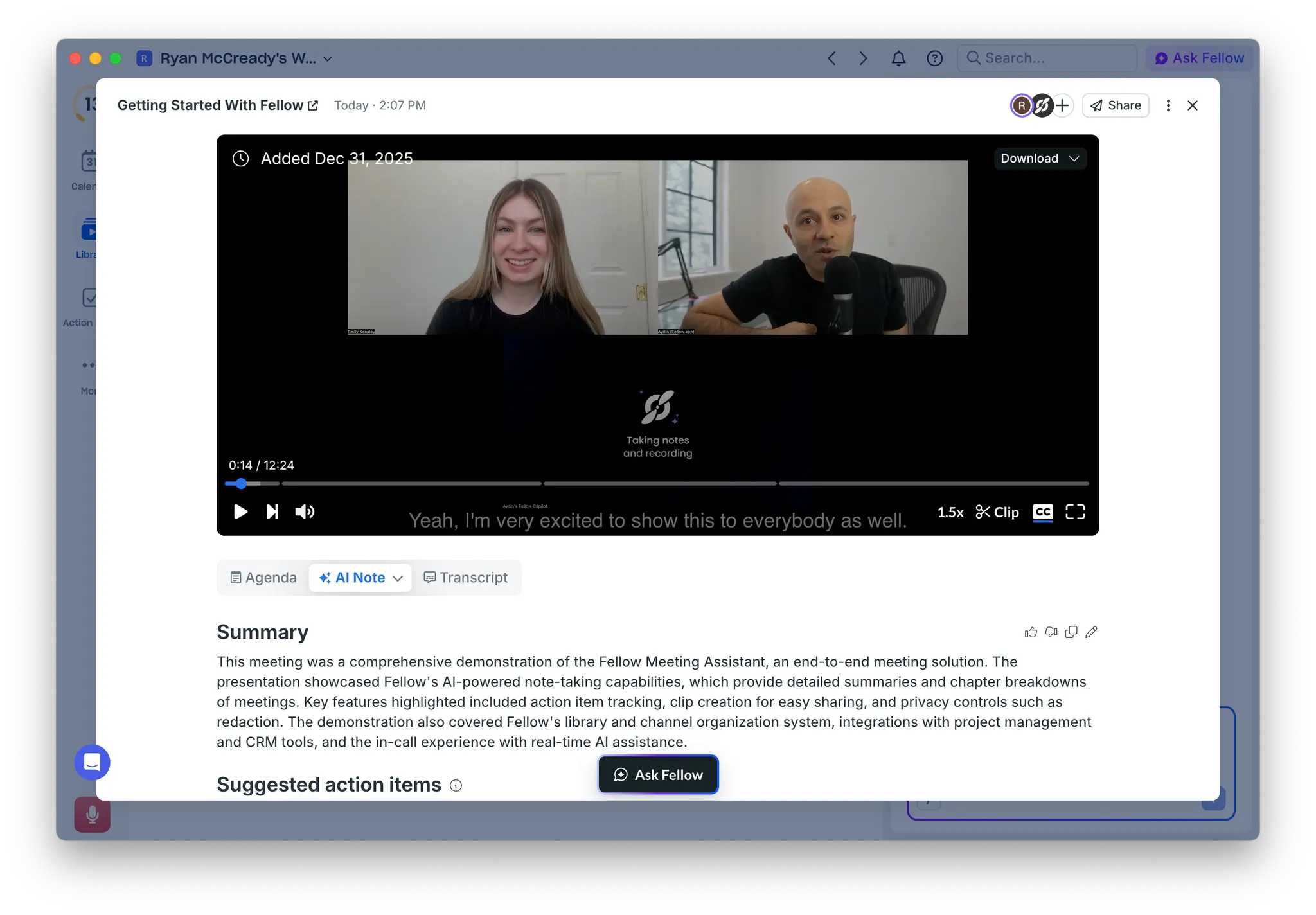
I haven't seen anyone in this space truly solve this. Fellow makes a decent attempt with their onboarding flow and demo meeting. You can explore a sample output right away to see how the AI extracts key action items and meeting summaries.
But even with that demo, it still took me about a week of actual calls to understand where Fellow fits into my workflow and what makes it worth using. For a tool with a two-week trial, that timeline is tight. Some users won't hit that "this is actually great" moment before being asked to upgrade.
Works out of the box (5/5)
As soon as you land in the desktop app, you’re basically ready to start recording your next meeting. Because you answered those setup questions during sign-up, there isn’t really anything else to set up initially.
Fellow automatically syncs with your Google or Microsoft calendar, so all your upcoming meetings are already sitting there in the app. You could literally sign up ten minutes before a call and capture everything without any other setup steps.
That's the kind of "it just works" experience that keeps people actually using a tool instead of abandoning it after a week.
2. Security & Control (18/20)
Meeting recordings capture some of your most sensitive internal and external conversations. Sales calls, strategy sessions, performance reviews, and more. You need to know that data is being handled carefully.
Fellow does almost everything right here. They're upfront about never using your data to train AI models, which most tools won't commit to. The admin controls are extensive, letting you manage recording policies, redact content, and control who sees any meetings or notes. And deleting old recordings is extremely easy, with auto-delete options that actually work.
The only real weak spot is the disclosure process for botless recordings. With the bots, everyone can see that you’re recording. But with botless recordings, there's no automated way to notify participants just yet. That might not matter for internal team meetings, but it creates real problems for client calls or anyone in a regulated industry.
Disclosure tools (3/5)
The disclosure process in Fellow depends on whether you use bot or botless recording, and the difference matters.
With bot recordings, disclosure basically handles itself. Everyone can see the bot on their screen. You can send automated emails before the meeting starts to let participants know it'll be recorded. This is perfect for client calls or anyone outside your organization.
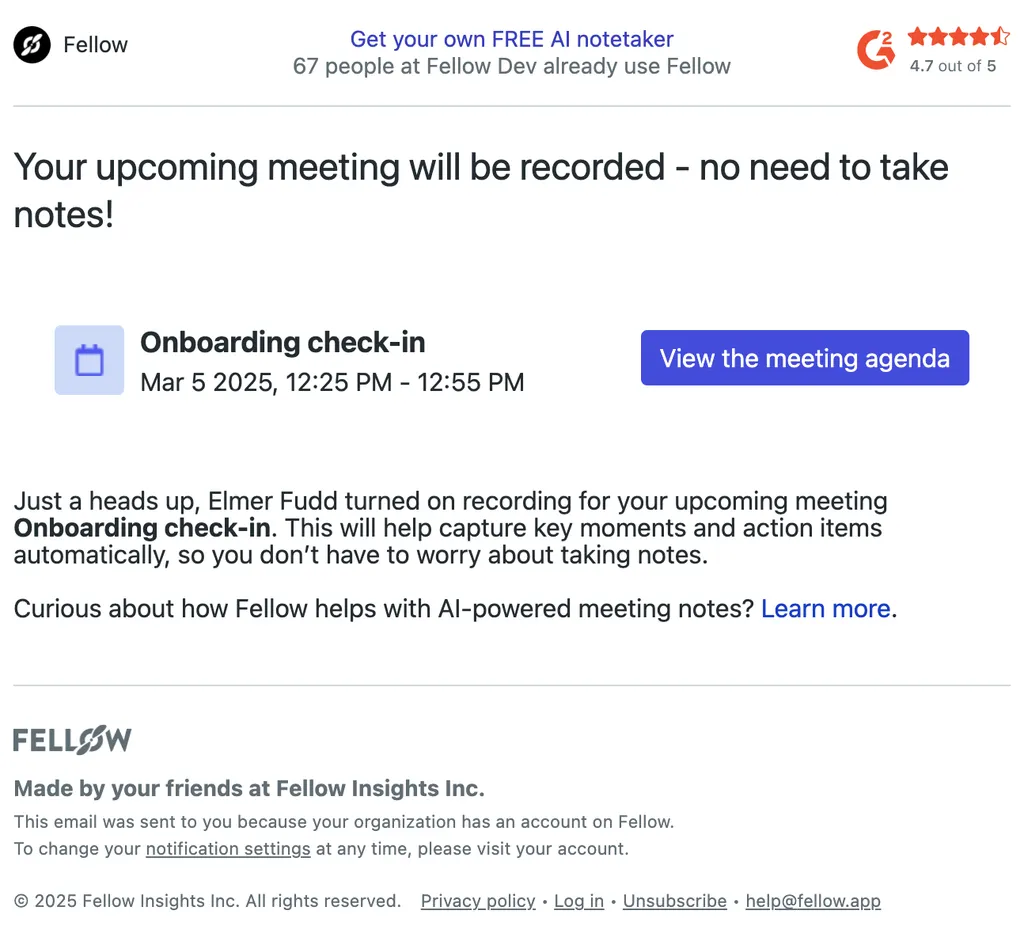
Botless recording is where I ran into problems. Other users in your workspace should see an icon on the meeting, but there's no automation to disclose to people outside your team. You have to handle that manually every single time.
Fellow just rolled out botless recording recently, so maybe better disclosure tools are coming. But right now, the lack of guidance creates real liability if you're in a regulated industry or just care about getting proper consent.
Access & sharing controls (5/5)
The amount of control you have over your workspace is very impressive, especially if you're the admin. Workspace admins in Fellow get deep control over recording and disclosure policies.
This isn't surface-level stuff either. It's the kind of granular policy management that shows Fellow was built for actual teams, not just individual users trying out a meeting tool.
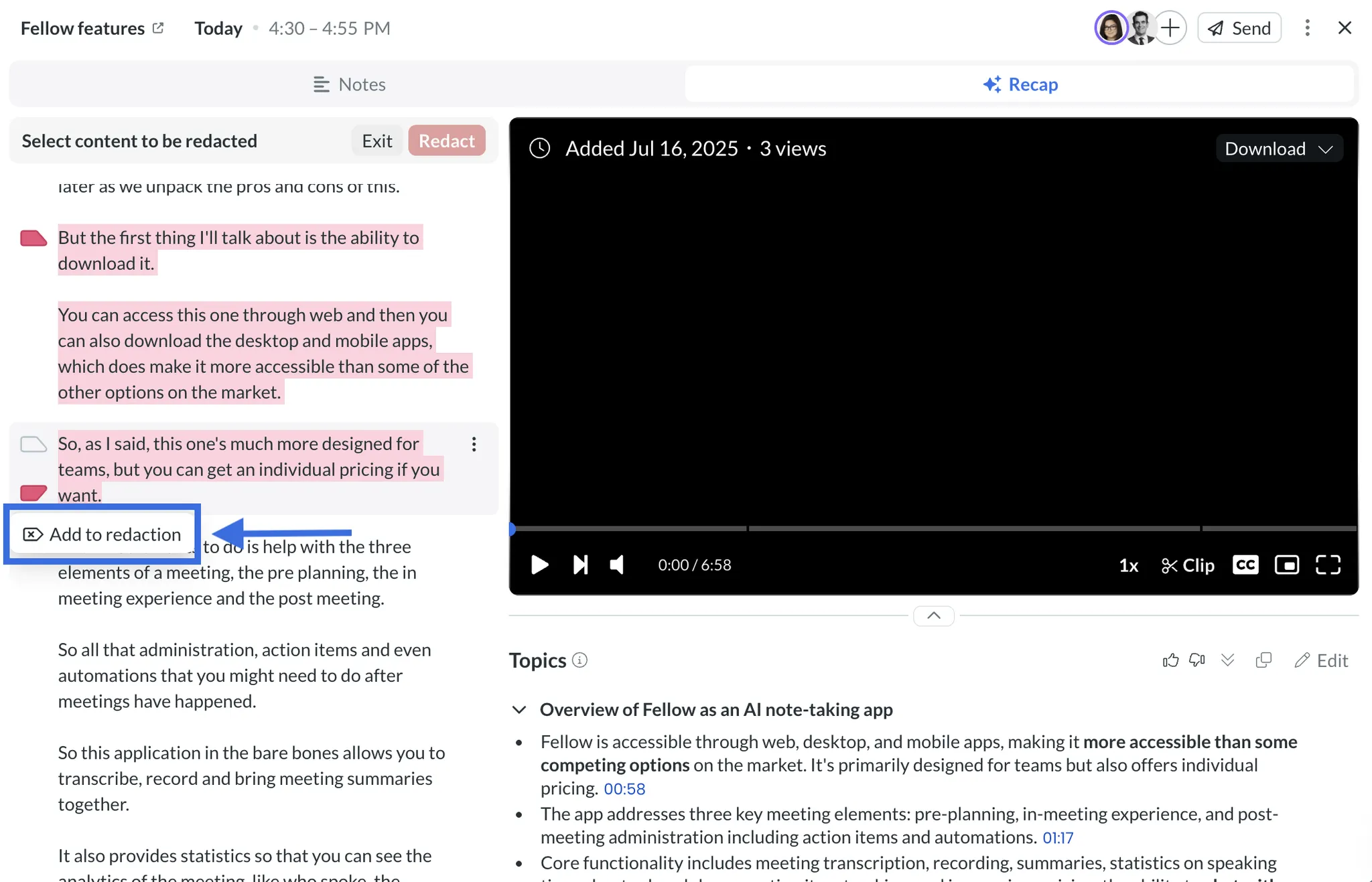
You can control how meetings are shared both internally and externally, remove specific users from notes or meetings, and even redact content before it's shared with your team or clients. And the redaction feature is particularly useful if you need to share a call but want to strip out internal strategy discussions first. It's pretty slick.
Data training policy (5/5)
Fellow is very clear from the start that they never use customer data to train their AI models. This can't be said for most other meeting recording tools on the market today. A lot of competitors bury this info deep in their terms of service or just stay silent about it entirely.
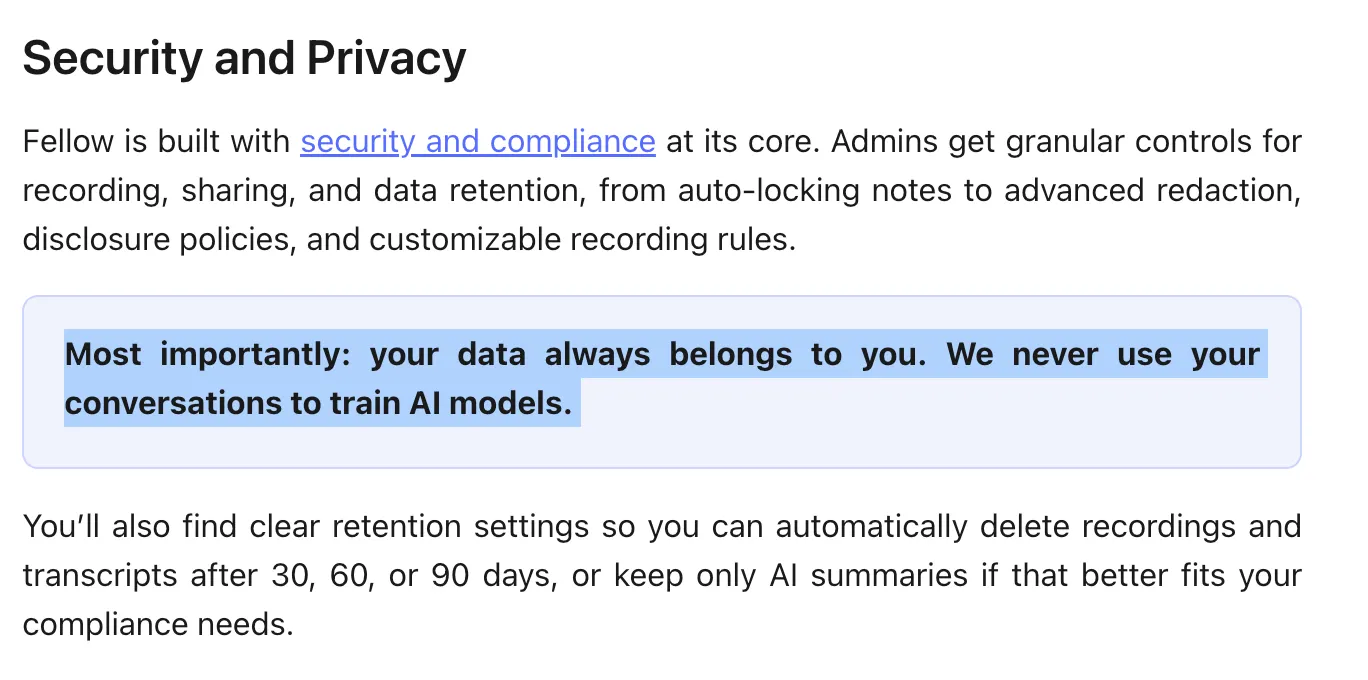
This transparency is very refreshing because Fellow is working with a ton of data. Knowing that none of that data leaves your workspace or gets fed into model training will make it easier to get your whole team on board.
My only complaint is that they should highlight this more in the onboarding flow. Most users probably don't know about this policy unless they dig into the documentation, and it's a big advantage over others in the space. But that's not worth losing a point over.
Data retention control (5/5)
Managing old meeting data can become a nightmare fast. After a few months of recording every call, you're sitting on hundreds of recordings and notes that you'll never look at again.
As we have already seen in other sections, Fellow gives you a lot of control over your data and recordings. You can quickly erase a meeting or note by simply clicking the Delete button.

Or you can jump into the Settings tab and set up an auto-delete after a set period, like 30 or 90 days. Admins can enable this for the entire workspace as well, which prevents your library from becoming an overwhelming archive.
Getting rid of recordings is almost as easy as creating them in Fellow. But the auto-delete feature is what earns them a perfect score here.
3. Collaboration & Workflows (18/20)
The real value of these meeting recording tools shows up when they help your team actually work together.
You need to be able to easily prep for meetings together, share outcomes with the right people afterward, and turn those chats into tasks that actually can be worked on. Most tools do one or two of these things pretty well.
Fellow handles almost all of them. The pre-meeting collaboration features actually get your team to show up prepared instead of winging it. And the action items function like real tasks instead of text blocks you'll never look at again.
The one place Fellow stumbles is sharing notes outside your workspace. It works, but it’s clunkier than it should be, and it adds a lot more friction to my workflows.
Pre-meeting collaboration (5/5)
Once you're in a workspace with your team, anyone can contribute to the agenda doc as soon as it shows up on your calendar. Add notes, action items, links, photos of your dog, whatever you need. And because you can link recurring meetings together, you can assign templates to those agendas automatically.
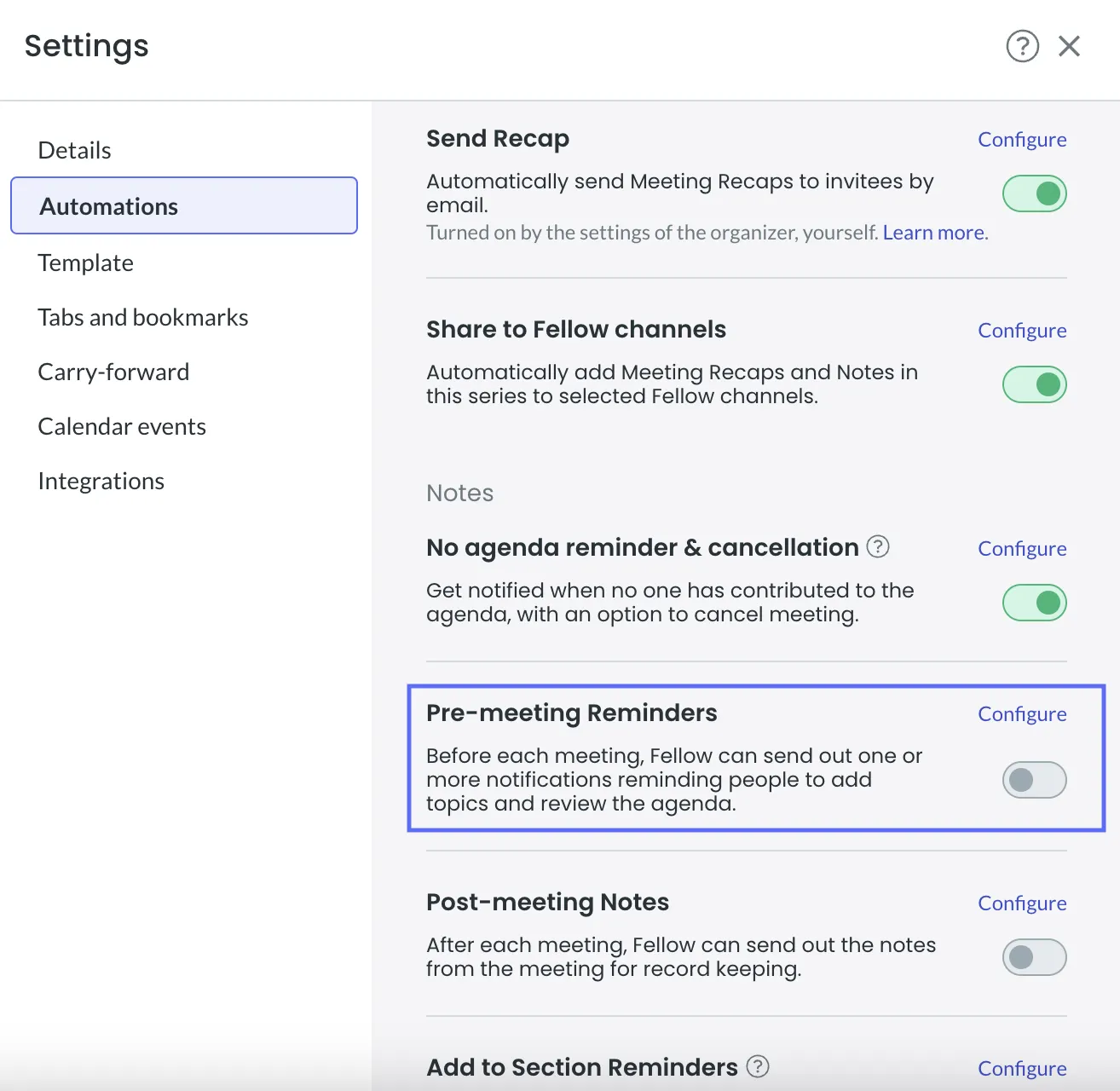
I really like the automations in Fellow that push people to actually prep for the meeting. Because sometimes you just need a little reminder.
The meeting creator can set up automatic reminders through email or Slack to contribute to the agenda. You can even send reminders to specific teammates to fill out certain sections, like asking someone to update metrics before your daily check-in.
And here's where the automations get, well, interesting. You can auto-cancel a meeting if no one adds content to the agenda doc. That might sound aggressive, but it's brilliant for canceling pointless meetings that shouldn't happen anyway.
Post-meeting distribution (4/5)
The customization options for post-meeting recaps are exactly what you want to see. You can control the timing, the channel, the message, and who actually gets the recap. For a sales call, you could set it up so that only your internal team gets the full notes while clients get something different.
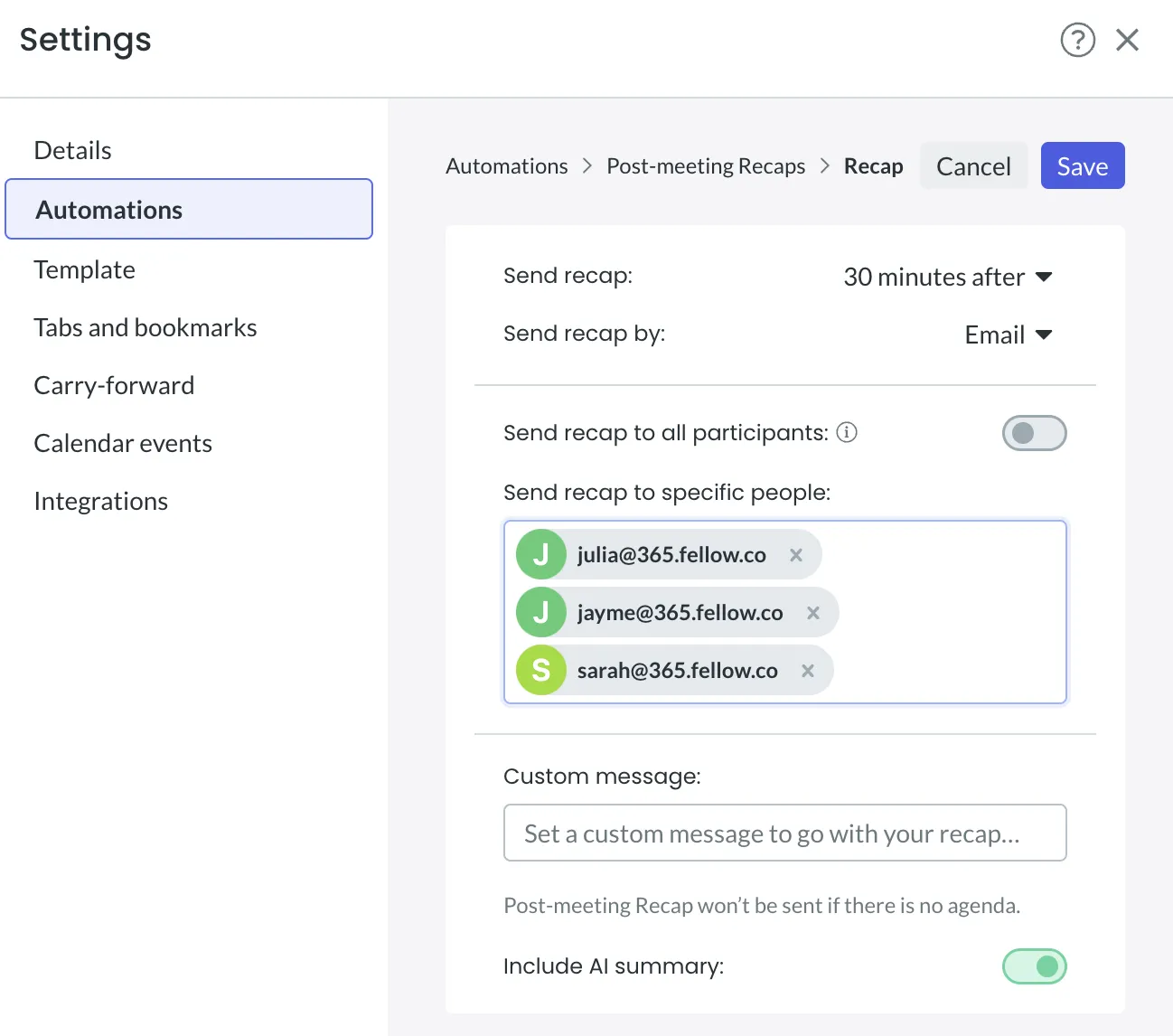
My only major complaint in this section is all about sharing notes outside your team workspace. They offer a handful of ways to do this, but I'm never really sure which method is best for different situations.
New task workflows (4/5)
Action items are one of the strongest features in Fellow. A lot of other recording tools will generate to-do lists automatically, but at the end of the day, it’s just a block of text sitting in a document.
Fellow treats action items like actual tasks. You can instantly add due dates, assign them to teammates, and send them directly to your project management tools. Or just track everything directly in Fellow if that's how you want to work.
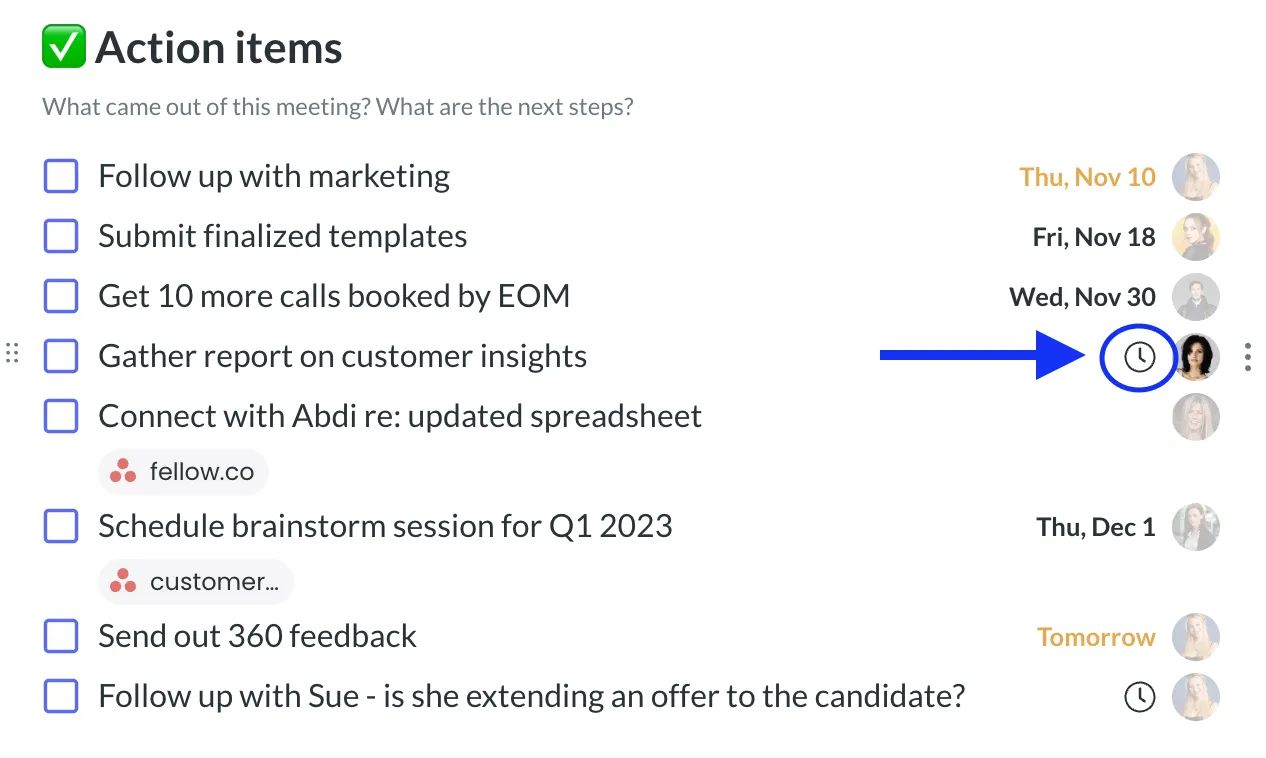
To be honest, I lean on the AI to automatically create action items at the end of meetings more than anything else.
One thing I figured out by accident is that you can push incomplete action items from one recurring meeting to the next. So if a task didn't get finished, it actually carries forward instead of getting lost.
Action items can even be used to trigger Zapier flows, which opens up a lot of interesting use cases. My only real problem with the tasks is that the AI-created action items could be a little better. I found myself getting action items that were just simple questions or cross-talk that the AI misunderstood. If they could tighten up that detection, this would be a perfect score.
Cross-meeting context (5/5)
Recurring meetings tend to start from zero every week unless you actively work to connect them. You forget what you decided last time, or have to rehash the same discussion again.
Fellow actually tries to solve this common pain point. As we covered above, you can push incomplete action items from one meeting to the next in a recurring series. All of the talking points you didn't get to chat about can be automatically moved over as well if you want to:
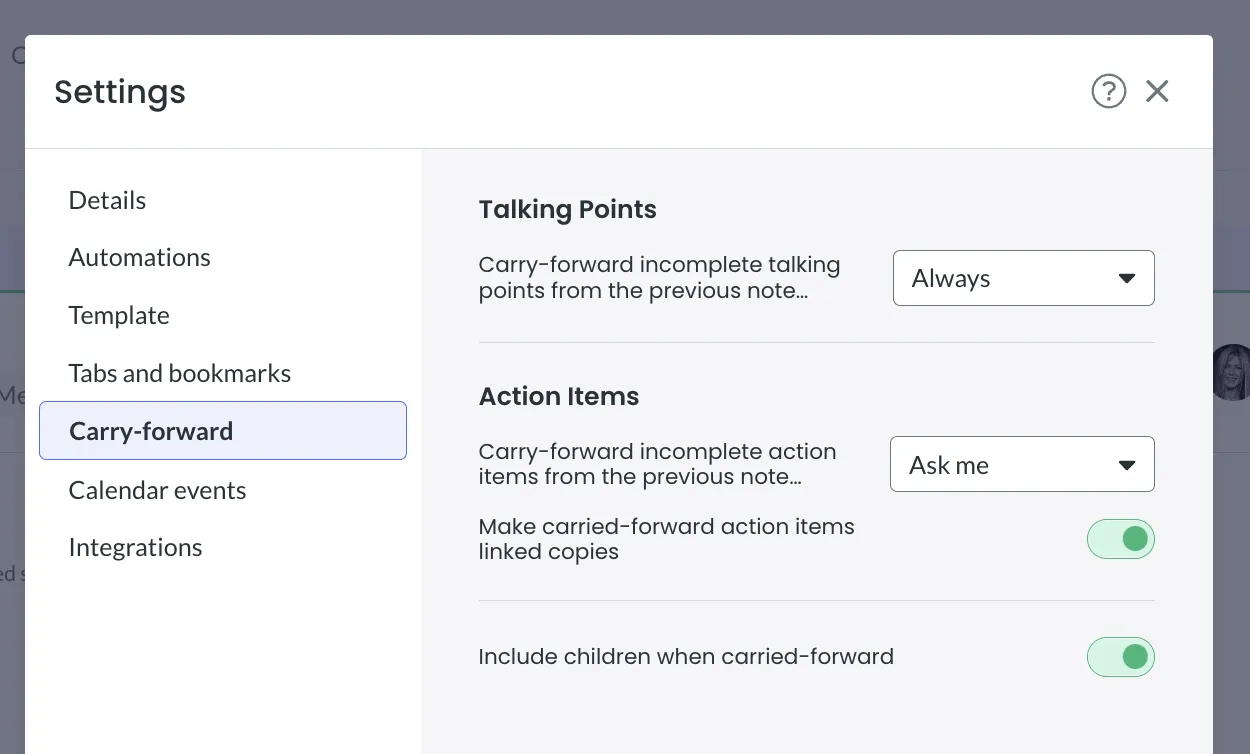
The connective tissue that keeps context flowing from one meeting to the next without much manual work is why I gave them a perfect score in this section.
Now, if you need to pull context from older meetings, the Ask Fellow button works pretty well, too. Just prompt it for what you're looking for, and it will search for that info across your entire meeting history. I've used this feature a few times when trying to remember when we made a specific decision or what someone talked about a few weeks ago.
4. Integrations & Apps (14/20)
A meeting tool is really useful if it connects to everything else your team is already using. If you're constantly copying and pasting data between apps, the tool isn't actually saving you much time.
Fellow’s calendar integration works really smoothly from the jump. Everything syncs automatically, and I'm a big fan of how fully formed the Slack and Teams integrations are. The native integrations with Linear, Asana, and Trello are welcome additions, too.
Exporting data is where things kinda fall apart. Depending on what you want to export, you have to kinda jump around the app to find it. AI Notes are in one menu, while transcripts and video files are in a completely different spot. This is not solely a Fellow problem; a lot of the competitors in the space also limit exporting. That said, the Zapier integration is strong and opens up a lot of possibilities, but sometimes adds unneeded friction where automation should make things seamless.
Calendar integration (4/5)
Your calendar syncs with Fellow as soon as you finish signing up. Once you connect your Google or Microsoft calendar, all your meetings automatically appear in the app going forward.
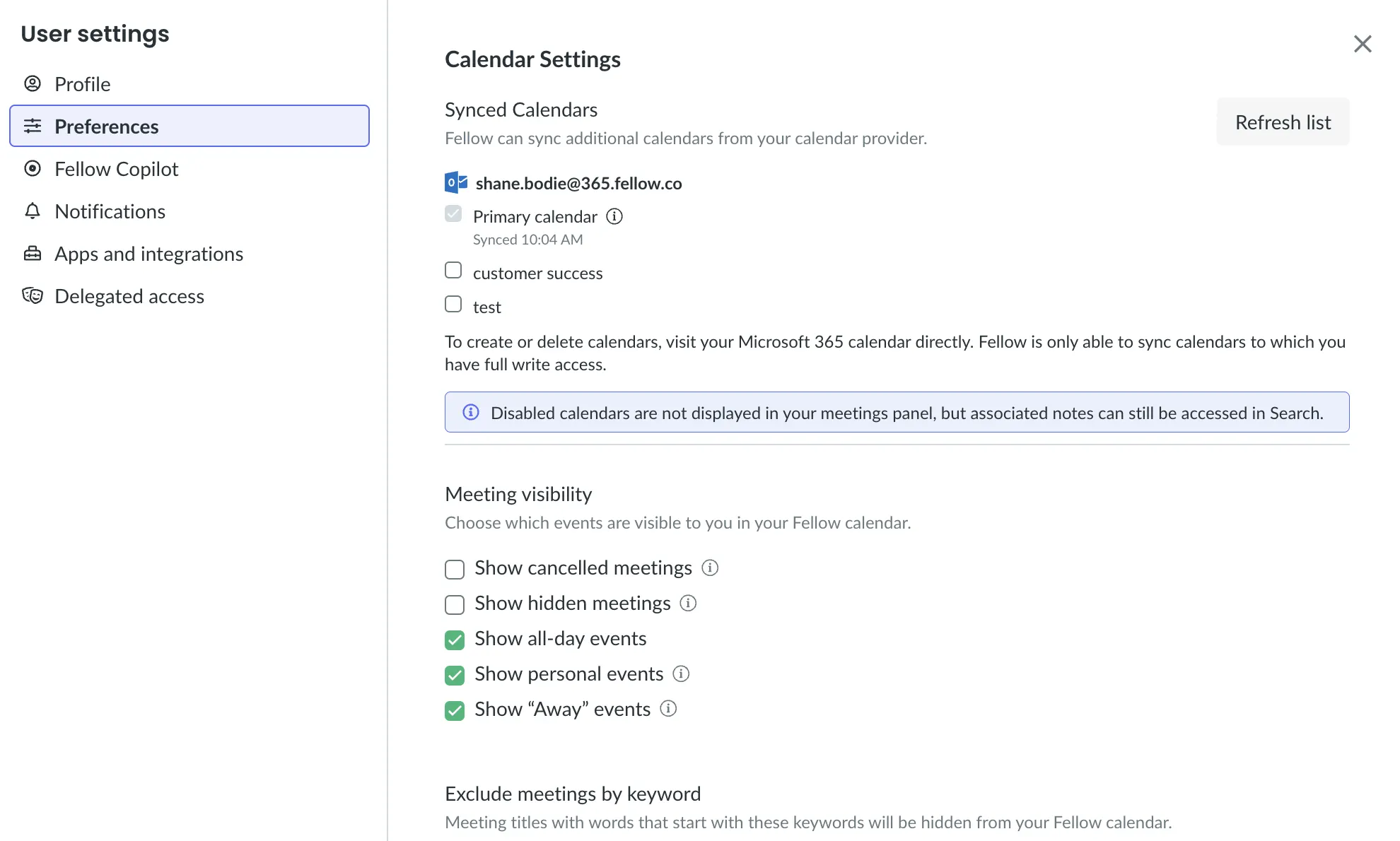
They allow you to add secondary calendars to your Fellow account if you need them. Or create a separate Fellow account for your personal calendar if you don't want work and personal meetings all mixed together. That kind of flexibility matters if you're a freelancer or someone who doesn't have a clean work-life split.
Additionally, I'm a big fan of the Calendar view in Fellow. It helps you keep an eye on what's coming up in the next week without constantly switching between apps.
The only real nitpick I have is that Fellow only integrates with Google and Office 365 calendars. That covers most business users, but it's still a limitation worth noting for some.
Where work happens (5/5)
Slack and Teams are where most teams actually communicate, and the integrations here are really strong.
I'm a big fan of any tool that lets you customize how you interact with its key features, and Fellow is one of the good ones. My favorite part of the Slack integration is how easy it is to add action items or content to a meeting brief right from the Slack app.
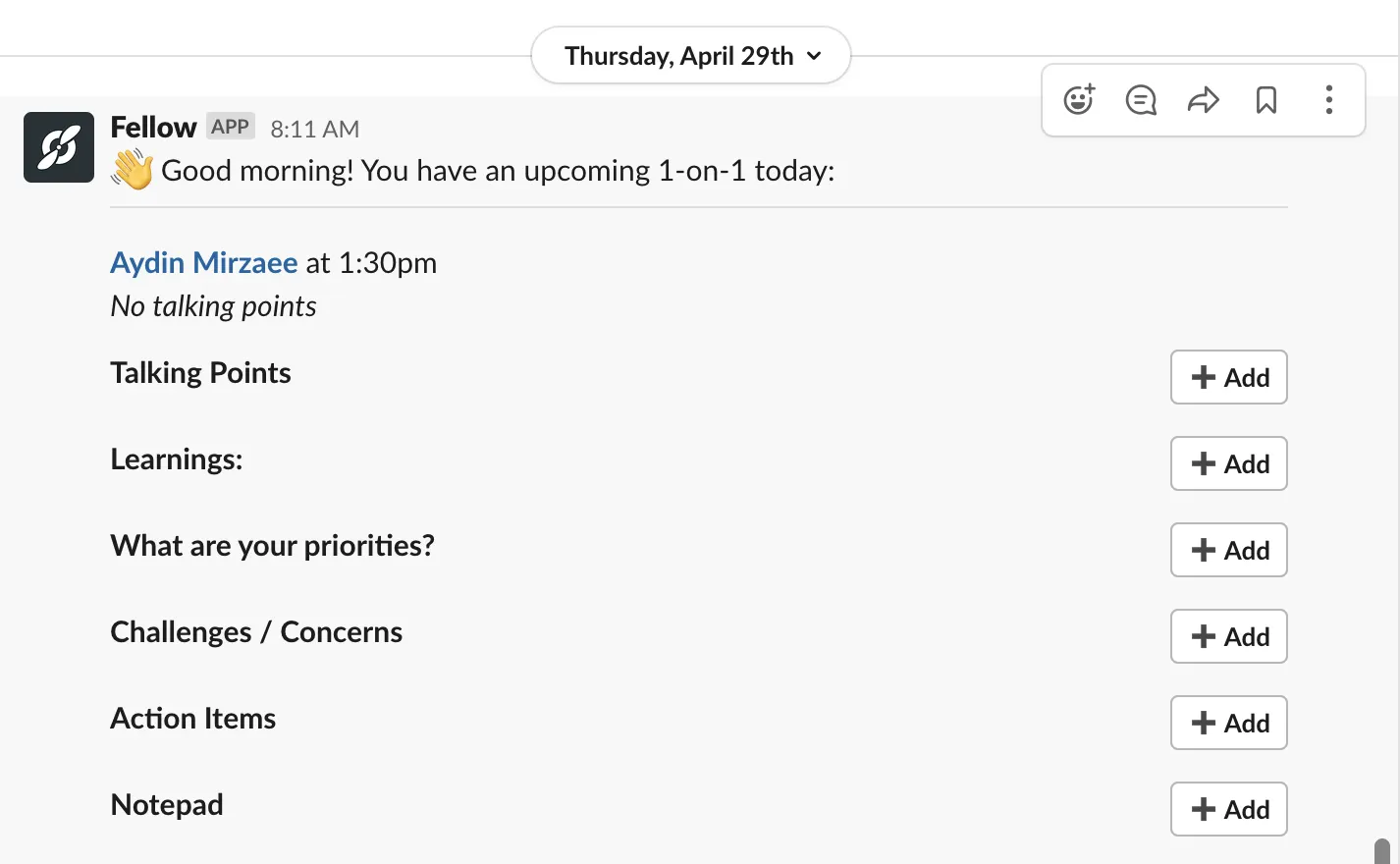
The daily and weekly digests in Slack are also helpful when you've been in back-to-back meetings all day and have no idea what was actually decided by the end of them. The feature list for each of these integrations is impressive. I recommend just checking out their docs to see everything that's possible.
Beyond Slack and Teams, there are native integrations with Linear, Asana, Trello, and a handful of other popular tools.
Export formats (3/5)
Like a lot of meeting recording tools, Fellow wants you to stay in their app as much as possible. Getting the transcript out requires copying and pasting it into a doc or navigating to a completely different menu to download it.
What bothers me is the inconsistency. Exporting the Agenda or AI Notes from meetings is straightforward, just a few clicks, and you have a doc. But if you just want the transcript its in a fully different menu. It's not a huge deal, but it's annoying friction that adds up over time.
This is one place where Fellow has too many buttons, actions, and features, so the best ones are hard to find.
The weird part is you can send the entire transcript to Zapier, but downloading it directly from the app is kinda clunky and does not scale.
That said, making it easy to export the AI Notes is why they got 3/5 in this section instead of 0/5. Other tools have scored zero because they make accessing any of your data incredibly difficult. Fellow at least gets you halfway there.
No-code support (3/5)
The Zapier integration is strong and opens up a lot of possibilities for what you can do with Fellow meeting data and action items. For example, you can set up a Zap that triages all of your action items to the right Notion workspace or create an automated client-safe summary of all the team meetings you’ve had over the past month.
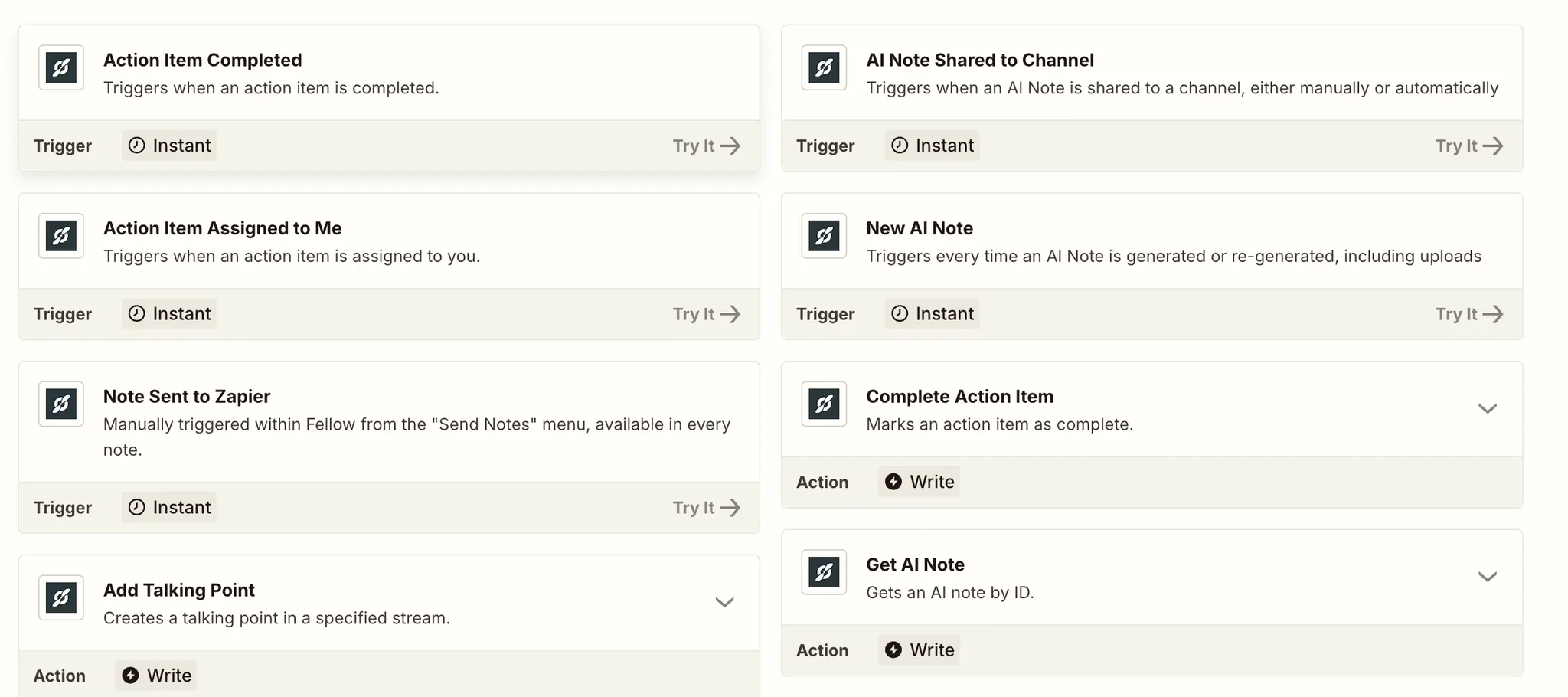
I do wish there were more actions and triggers available, especially now that Zapier has integrated AI so deeply into the platform. The options feel limited compared to what should be possible.
My main complaint, and this isn't just a Fellow problem, is that you have to manually kick off most Zaps. Getting them to start automatically requires some fancy footwork and folders. The integration itself is well-built, but the day-to-day use adds annoying hoops to jump through.
5. Templates & Outputs (16/20)
Meeting tools are ultimately judged by the quality of their output. Fellow could have perfect integrations and seamless collaboration, but if the notes are garbage or the templates force you into rigid formats, none of that matters.
The outputs from Fellow have been consistently solid across all my meeting types. The notes are structured well and easy to scan, while also being ready to share with clients without much editing. Template customization is rather easy, too. Just copy one of their templates and make it your own in a few minutes.
Where Fellow stumbles in my experience is with the quality of the AI action items. The AI misses too many of them, which is frustrating for a feature that's supposed to be a core strength. And despite having over 500 pre-built templates, actually using them is clunky enough that I found myself just sticking with the generic defaults most of the time.
Output quality (3/5)
The output from almost all of my meetings with Fellow has been very good, especially when I'm using a template like the 1:1 or attending a recurring meeting where there's some carryover.
I have found that the notes feel complete without being overwhelming. Unlike some tools that just dump massive amounts of information into a document, Fellow structures the output so you can dive deep or just scan for context.
The Summary at the top of all the AI Notes gives you a quick overview of what happened in the meeting, even if you weren't in the room. This is particularly useful when you need to loop someone in quickly or catch up on meetings you missed.
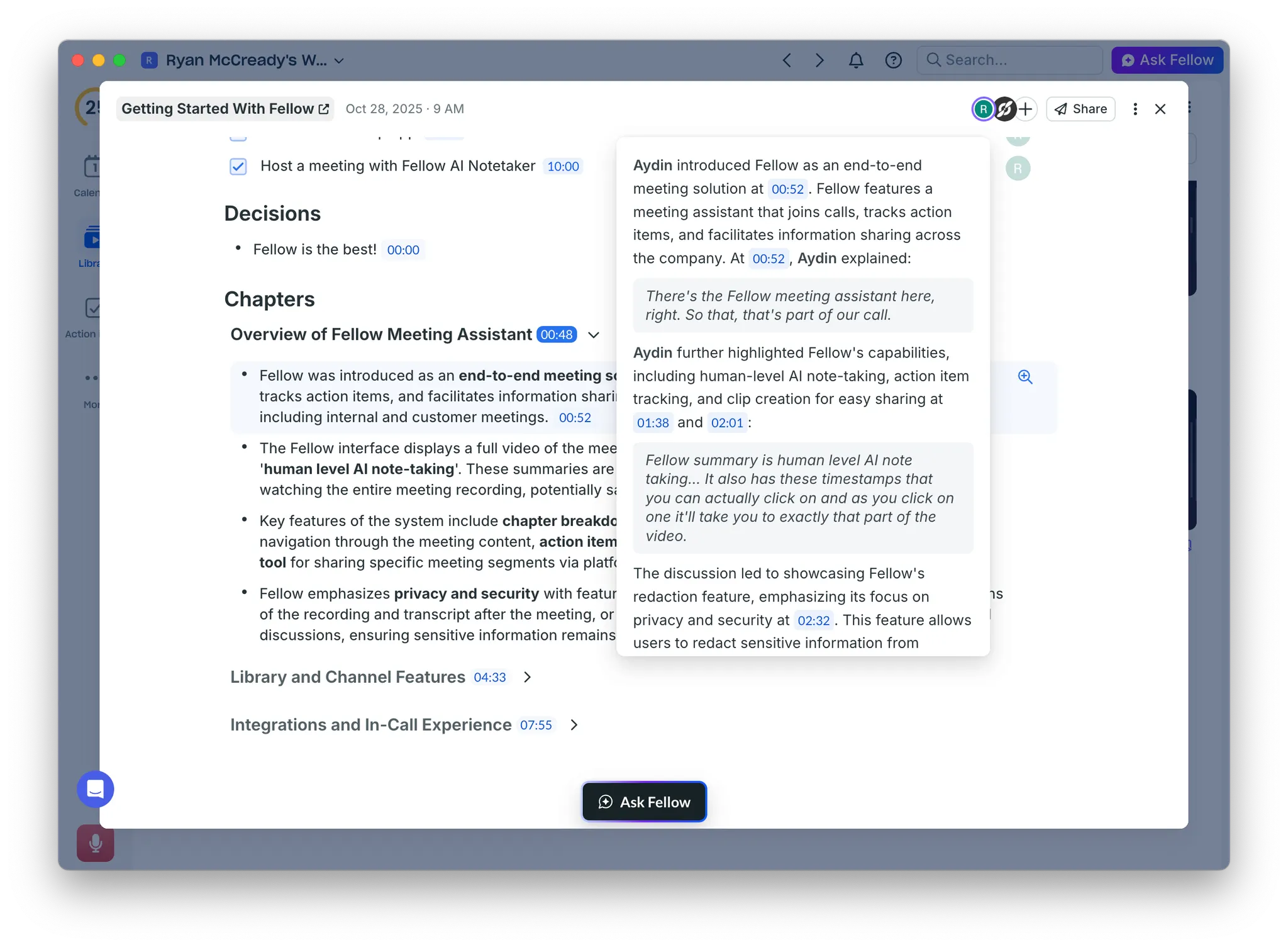
And if you need to dive a bit deeper, the X-Ray feature lets you see exactly where in the transcript each note or bullet point was pulled from, which builds confidence that nothing important was missed.
My biggest complaint is that the AI seems to miss a lot of the action items, which is supposed to be what sets Fellow apart from other tools. I would rather it grab too many action items instead of missing some by trying to be too selective about what makes the cut. As someone who wants to keep all my focus in a meeting and have the action items automatically tallied up at the end, this is a big miss.
Deliverable readiness (5/5)
With all the automatic sharing built into the platform, the AI Notes are basically ready to share with your team or even clients without much editing. The output is accurate, which we covered above, but the layout and structure of the notes are also very professional.
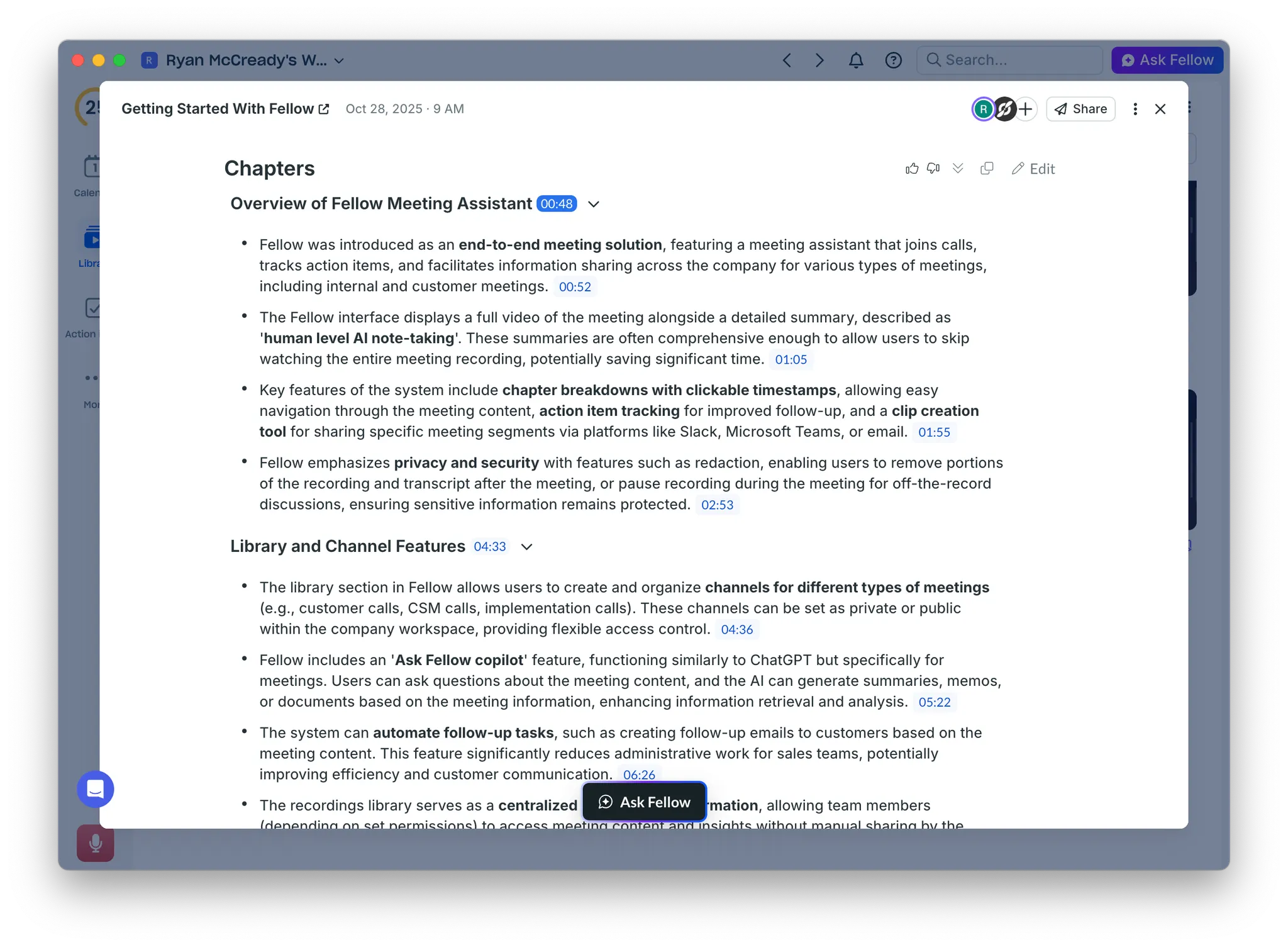
You can customize the AI Notes with templates to make them even better for specific use cases. But I've gotten a lot of mileage out of just the generic notes for meetings that don't have a strict agenda or formal structure.
The only thing some people might find odd when sharing AI Notes with people outside their organization is that you're also sharing the video recording. I can't imagine many people want to sit through game tape of a meeting in their spare time, but it's there if they need it for some reason.
Pre-built templates (3/5)
Fellow has a massive library of agenda templates to choose from. There are over 500 agenda templates to choose from at the time of publication. Templates for basically every use case and industry you can think of.
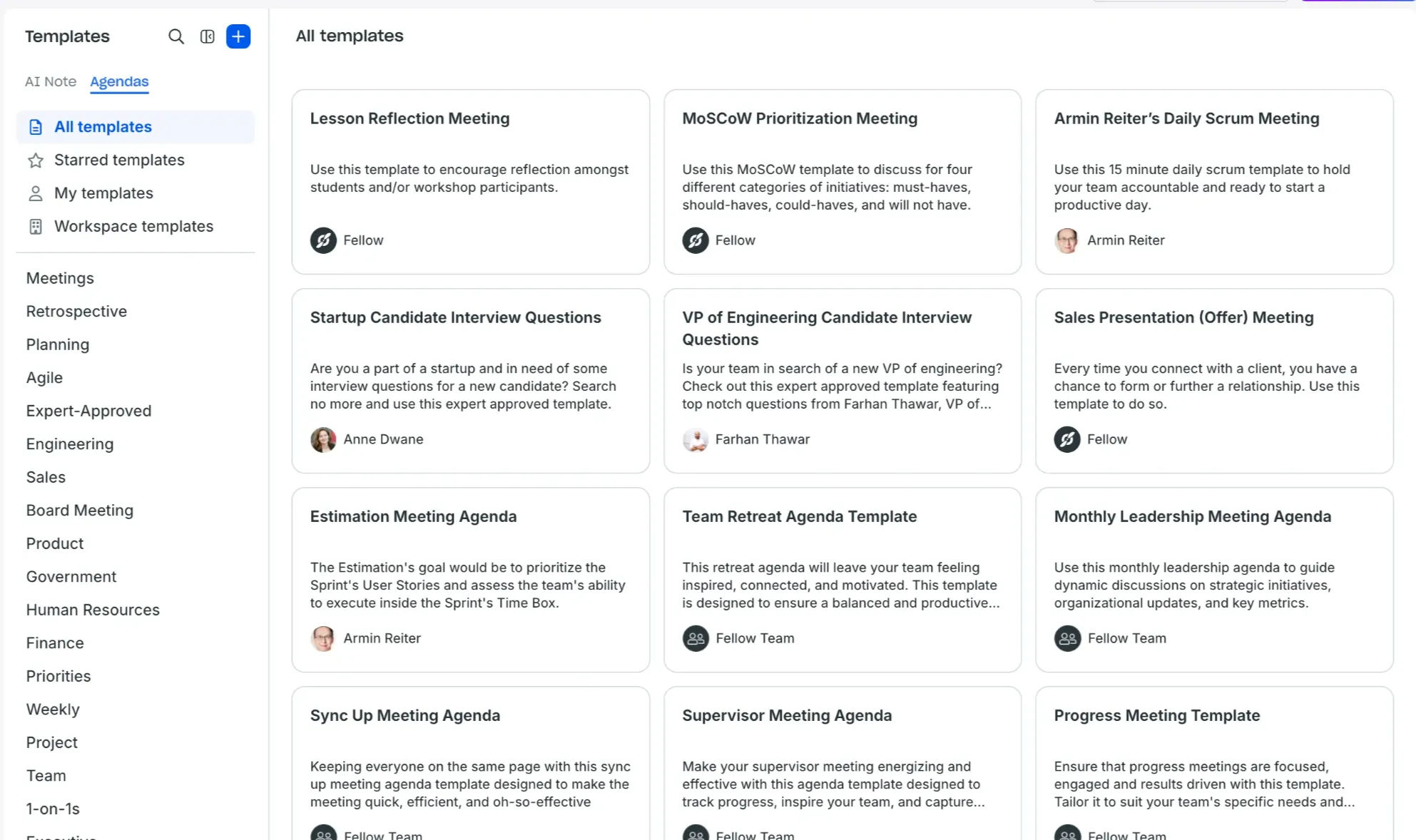
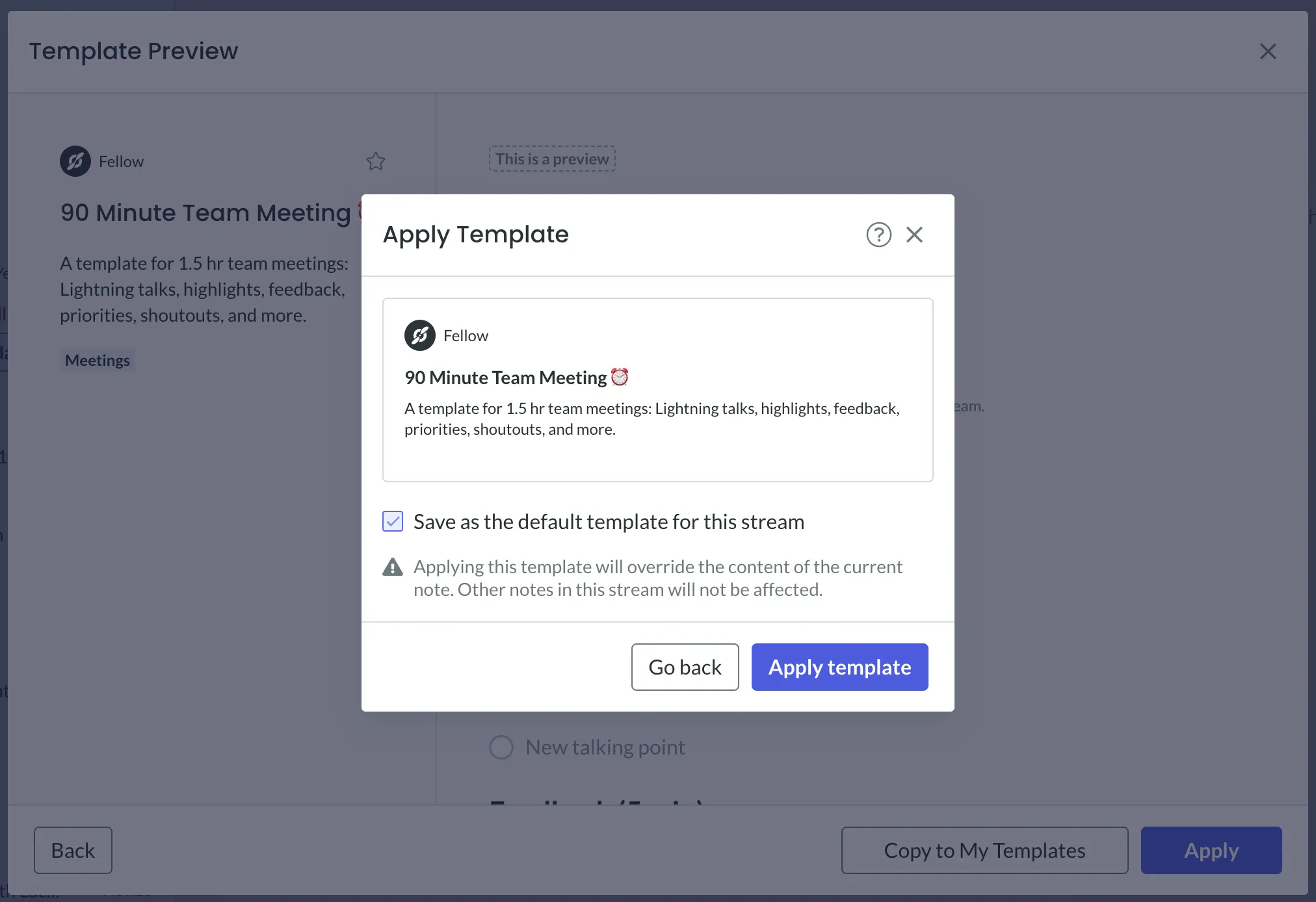
You can apply them to individual meetings or require recurring meetings to use specific templates automatically, which I’m a big fan of.
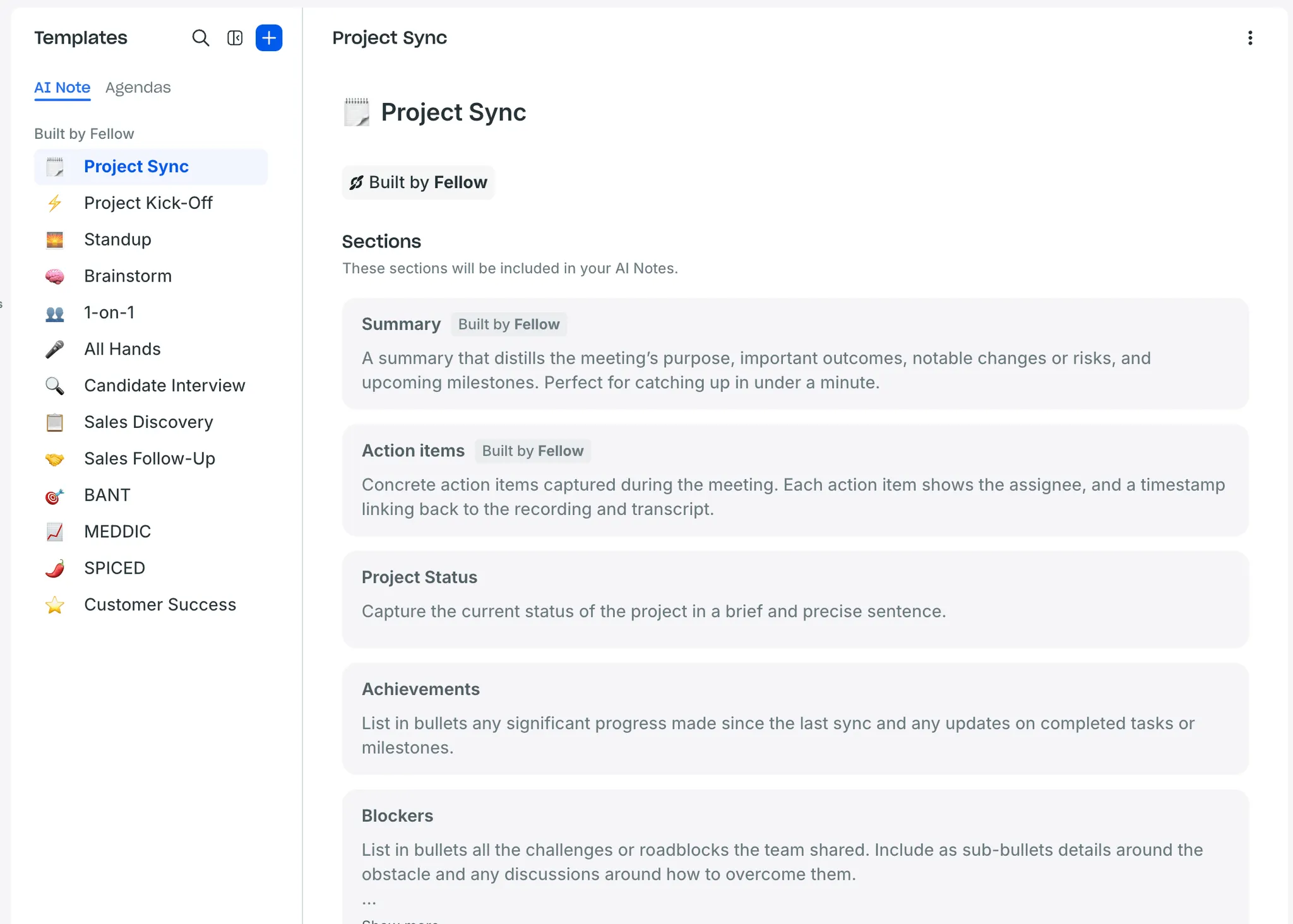
They also have templates for the AI Notes as well. Like some other AI-powered recording tools, these are basically structured prompts that give the AI an output format to follow. I found these helpful when I forgot to apply an agenda template or had no idea what would be covered in a call.
Even with all these template options, I reduced the score because of how clunky they were to use in my day-to-day work. It caused me to just stick with the generic templates most of the time.
Once you figure out how to use them correctly, they become pretty helpful. But not everyone is going to discover them on their first or second use, and the learning curve shouldn't be that steep for something this basic.
Template customization (5/5)
Creating your own AI Note or agenda templates is extremely straightforward. If you don't want to start from scratch, you can edit any of the prebuilt templates that are already in the library. This is actually how I suspect most people will create their own templates.
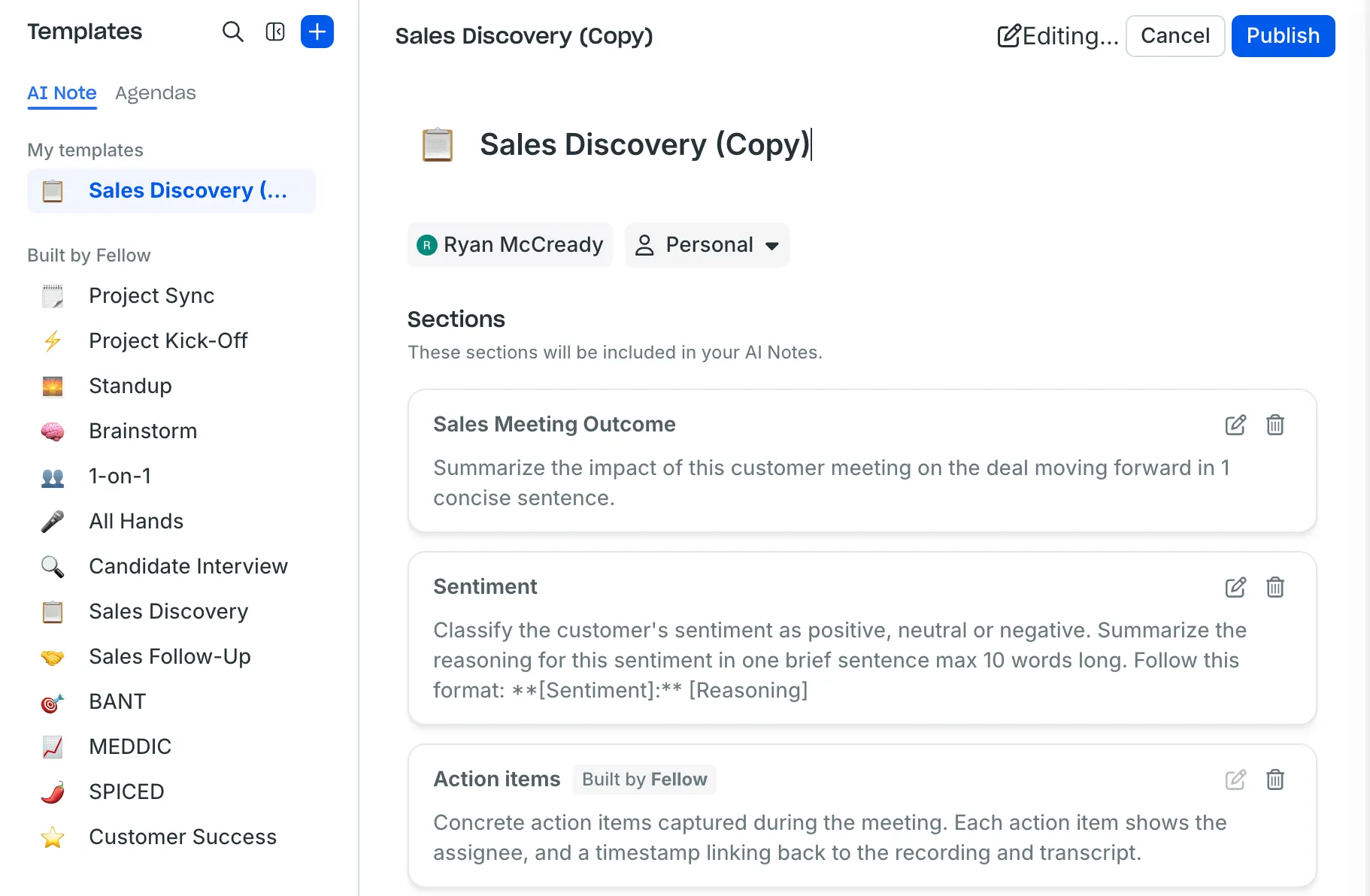
Starting with something that already works and tweaking it to fit your needs is way faster than staring at a blank template editor, which I appreciate.
It really only takes a few clicks to create a fully custom agenda or AI Note template. Add new sections, remove what you don't need, and adjust the prompts for the AI to follow. The flexibility is there when you need it, but you're never forced to build everything from the ground up. But you still can if you want.
How I Would Improve Fellow
Fellow has the foundation of a really strong meeting tool for teams. The collaboration features work well, the security controls are really robust, and the core functionality is solid as a rock. But there are some spots that create unnecessary friction and hold it back from being a true game-changer.
What's refreshing is that most of these problems have straightforward solutions. They're fixable issues that would dramatically improve the experience for power users without disrupting what already works well. So, let’s take a quick look at how I would improve Fellow.
1. Improve transcript exports
Fellow makes it easy to export AI notes and agendas, but then puts transcript exports in a completely different part of the app, which creates an inconsistent and frustrating experience.
The fix is simple, too. Just add a download button for transcripts in PDF, TXT, and DOCX formats in the same menu. Or for an even quicker fix, improve the onboarding materials to show where the button to download transcripts is in the app. Users shouldn’t have to go weeks thinking a feature doesn’t exist, only to randomly stumble upon it one day.
2. Improve AI action item detection
The AI currently misses genuine action items while sometimes creating false ones from questions or discussion points. Fellow could offer two modes: the current selective approach and an aggressive mode that captures every potential action item for users to triage.
Then add a quick filtering interface at the end of meetings where you can review ALL suggested action items and approve or dismiss them with a single click. This would solve the miss rate problem without overwhelming users who prefer the current behavior. And it would reinforce Fellow's positioning around their strong action items as a core differentiator.
3. Redesign the template experience
Having 500+ templates sounds impressive until you realize most users will never find the right one or figure out how to use them effectively. Fellow needs a smarter template recommendation system that suggests relevant templates based on meeting titles, participants, and recurring patterns.
When you create a new meeting, Fellow should proactively ask something like: “This looks like a client check-in. Want to use the client call template?” The usage process should also be a little more obvious. Maybe add a template picker that appears when you open a new meeting rather than requiring users to hunt through the settings or library.
4. Build better Zapier triggers
The Zapier integration is powerful on paper, but requires too much manual triggering to be useful in a lot of my daily workflows. Fellow should detect patterns and automatically kick off Zaps based on meeting types, participants, or content. If every sales call goes to a specific Notion database, that should happen automatically after the first time you set it up, not require manual sharing each time.
Even adding smart triggers like "if action items are assigned to a specific team member, do this" that users can build automations around would be a nice feature. The goal should be to make Zapier flows truly automatic rather than require manual kickoffs.
Parting Words
Fellow landed at 84 out of 100, and that score reflects a tool that does a lot of things really well while stumbling on some basic stuff that should be solved by now.
The reason Fellow is worth considering for every team is that it actually helps them collaborate better. I know a lot of tools promise that, but from everything I have seen, Fellow really means it. Where it gets frustrating is around the stuff that should just work, but it’s limited for some reason.
If your team runs a lot of meetings and needs better ways to stay aligned, Fellow is definitely worth it, even with a few of the tradeoffs.
Never take meeting notes again
Record, transcribe and summarize your meetings with Fellow.
Get started with Fellow todayStart a free trial
%20(1).webp)
%20(3).webp)

.webp)